
Shopware 6 plugin
Products Price History
Price trends & EU Omnibus in one.
Automatically records your product prices every day and makes the history visible – as a trust-building chart on the product page and a compliant EU Omnibus display. Fully configurable, 31 languages, GDPR-free.
- 100% Shopware
- Certified Shopware Partner
- 31 languages
- GDPR-free
- Shopware 6.6 & 6.7

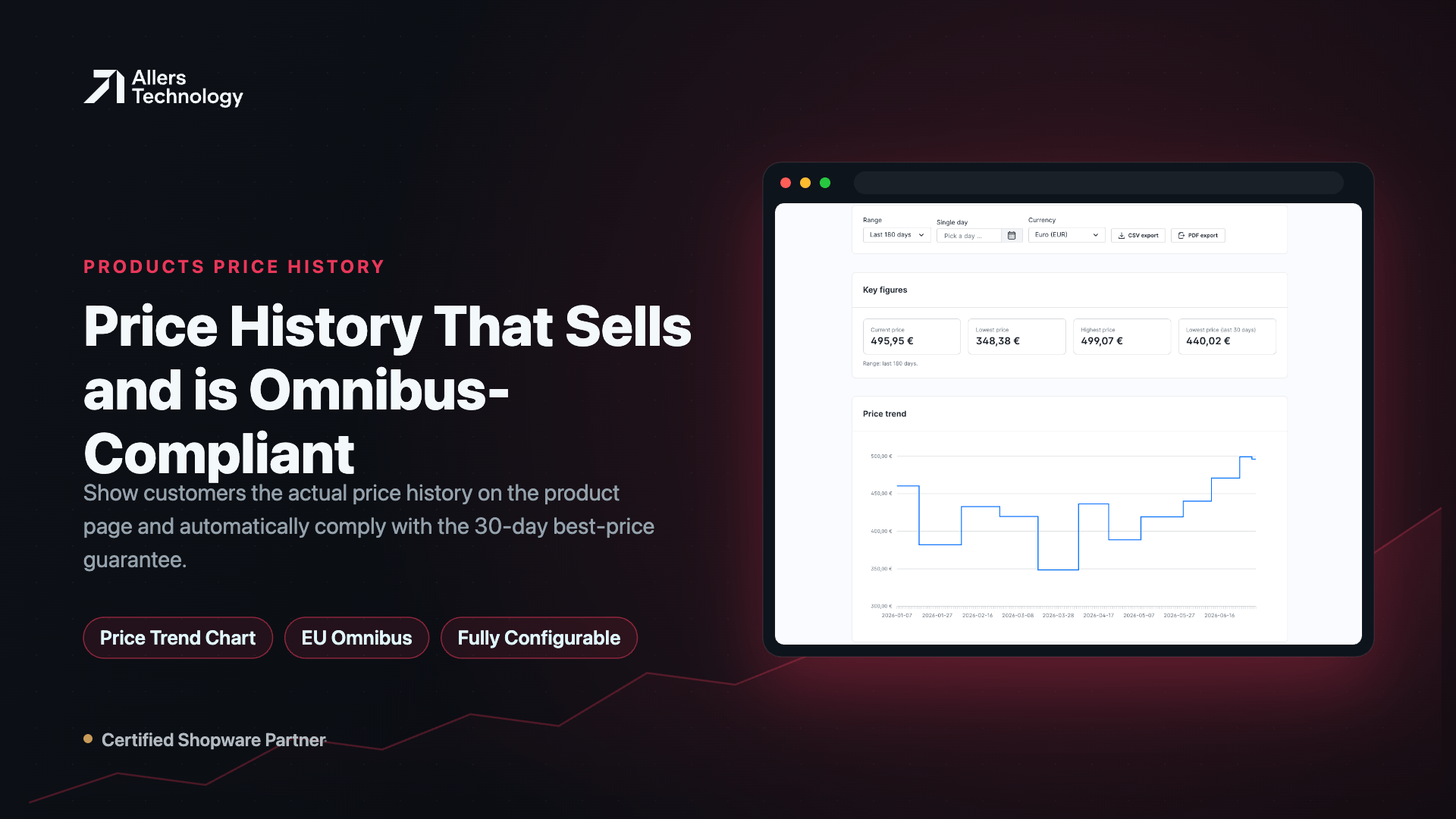
Screenshots
Features
- Automatic daily price snapshot – incl. variants and per currency
- Price-trend chart on the product page (optional, dependency-free, with tooltip)
- EU Omnibus / PAngV: 30-day lowest price, automatic & compliant
- Expandable storefront price table with “show all”
- Freely selectable position: own tab, below price, after buy widget, or description tab
- Admin product tab with key figures: current, lowest, highest & 30-day lowest price
- Interactive price-trend chart in the admin
- Searchable, sortable price table with time-range filters (7/30/90/180/365 days, custom)
- Dedicated “Price History” module under Catalogues with price change in %
- Export as CSV and PDF
- Records gross, net and list/strike price
- Configurable retention + separate cleanup task (lean even for large catalogues)
- 31 languages for admin, storefront and configuration
- GDPR-free – no personal data
- Compatible with Shopware 6.6 & 6.7
Description
Price transparency builds trust – and since the EU Omnibus Directive it’s often a legal requirement. Products Price History solves both in one plugin: it captures your product prices automatically every day, optionally shows customers the real price trend as a chart, and correctly displays the legally required lowest price of the last 30 days.
Two tools in one. Price-alert plugins can’t do compliance. Pure Omnibus plugins don’t give your customers an appealing trend view. This plugin combines both – a conversion-friendly customer chart and a legally compliant 30-day display.
On the product page (optional & fully configurable). The storefront display is off by default and can be enabled exactly to your needs: a dependency-free price-trend chart with hover tooltip, an expandable price table, and the Omnibus “lowest price in the last 30 days” line. You choose the position.
In the admin – full control. Every product gets a “Price History” tab with key figures, a line chart and a searchable table with time-range filters. Plus a dedicated “Price History” module under Catalogues. Export as CSV and PDF.
Lean – even for huge catalogues. Two separate background tasks: one captures prices daily, one independently cleans up old entries based on your configurable retention.
31 languages & GDPR-free. Admin, storefront and configuration in 31 languages. The plugin stores only product, price, currency and date data – no personal data whatsoever.
Note: The history builds up seamlessly from installation onward – prices from before installation don’t exist in Shopware. From day one, capturing runs automatically.
Compatibility & requirements
- Shopware 6.6 & 6.7
- PHP ≥ 8.2
- Community Edition / self-hosted
- Runtime requirement: active scheduled task runner + message consumer (Shopware standard)
Installation & configuration
- 1
Installation & activation – install and activate via Extensions → My extensions (or console: bin/console plugin:install --activate AtechProductsPriceHistory). Installation creates the table and default configuration.
- 2
Requirement – scheduled task runner and message consumer must be running (Shopware standard, typically via cronjob).
- 3
First data capture – history starts at installation; the plugin checks whether data exists and otherwise triggers the first capture immediately (starting value from day 1). Afterwards runs automatically every day.
- 4
Open configuration – Extensions → My extensions → Products Price History → … → Configuration.
Settings
| Setting | Default | Purpose |
|---|---|---|
| Retention (days) | 365 | How long entries are kept; drives the cleanup task |
| Default admin chart range (days) | 90 | Preset range in the admin chart |
| Enable storefront display | off | Master switch for the product-page display |
| Show chart | on | Price-trend chart |
| Show table | off | Price table |
| Show 30-day lowest price (Omnibus) | on | Omnibus line |
| Displayed range (days) | 90 | Range shown in the storefront |
| Initially visible table rows | 14 | Initial number of table rows |
| Position | own tab | own tab / below price / after buy widget / description tab |
- 5
Enable storefront – switch on “Enable storefront display” → choose elements → set position → save → clear the shop cache.
- 6
Omnibus note – the “last 30 days” fill up over time; right after installation the value is based on the days captured so far.
- 7
Troubleshooting – no new data? Check the scheduled task runner + consumer. Display missing in the shop? Check “Enable storefront display” and clear the cache.
Changelog
- v1.0.02026-07-01Initial release: price history & EU Omnibus in one plugin – production-ready for Shopware 6.6 & 6.7.
- New: automatic daily price snapshot per product, variant and currency (gross, net, list price).
- New: admin product tab “Price history” with KPIs (current, lowest, highest & 30-day lowest price), an interactive line chart and a searchable table with time-range filters (7/30/90/180/365 days, custom).
- New: dedicated “Price history” module under Catalogues – including price change in %, sorting, filters and export as CSV and PDF.
- New: optional storefront display – dependency-free price history chart with tooltip, collapsible price table with “Show all” and Omnibus row “lowest price of the last 30 days”.
- New: freely selectable display position – own tab, under the price, after the buy area or in the description tab.
- New: configurable retention + separate cleanup task – lean even for large catalogues.
- New: 31 languages for admin, storefront and configuration.
- New: GDPR-free – only product, price, currency and date data is stored.
- Compatibility: Shopware 6.6 & 6.7, PHP ≥ 8.2.
FAQ
Frequently asked questions
- Can I import prices from before installation?
- No. That data doesn’t exist in Shopware and can’t be reconstructed by any plugin. History builds up seamlessly from installation; capturing starts automatically.
- Does it meet the EU Omnibus requirement?
- Yes. The lowest price of the last 30 days is calculated continuously and can be displayed compliantly on the product page.
- Is any personal data stored?
- No. Only product, price, currency and date data – GDPR-free.
- Does it affect performance?
- Barely. The storefront display is optional; capturing runs as a nightly background task, and a separate cleanup task keeps the database lean.
Ready? See Products Price History in the Shopware Store.
Questions? info@allers-technology.com